Files
One shared store for everything you hand to players: challenge attachments, images used in custom pages, rule PDFs. Files are uploaded once here, then referenced from wherever they are needed.
Requires object storage
Files are stored in an S3-compatible bucket (MinIO, Ceph, AWS S3, …), not on the
application server. The instance needs S3_HOST, S3_PORT, S3_BUCKET,
S3_ACCESS_KEY and S3_SECRET_KEY set, and the bucket must exist, or uploads and
downloads both fail. Set S3_PUBLIC_URL to the browser-reachable address of the
bucket when it differs from the internal one, since it is the host embedded in the
links players receive. See Deployment.
The file list
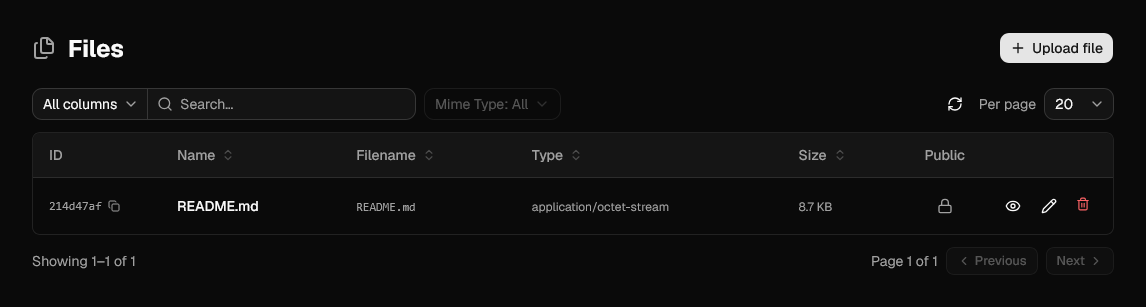
| Column | Meaning |
|---|---|
| Name | Friendly name shown when picking the file. |
| Filename | Name the file was uploaded under, and the name players get on download. |
| Type | MIME type reported by the browser at upload time. |
| Size | Stored size. |
| Public | Locked means the file is only reachable through a challenge it is attached to. |
The list can be filtered by MIME type and by public/private, which is the quick way to audit what is exposed before an event opens.
Uploading
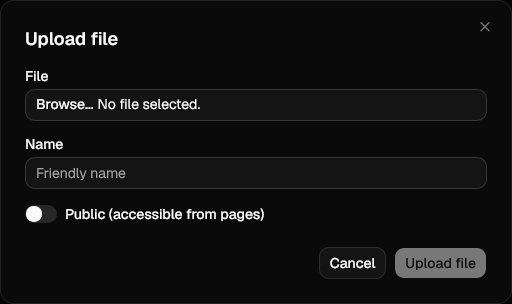
| Field | Notes |
|---|---|
| File | The file to store. |
| Name | Friendly name. Falls back to the filename if left empty. |
| Public | Off by default. See Public files below. |
You can also upload straight from the file picker inside any Markdown editor, without coming here first. Files uploaded that way are public, since page and challenge content embeds them directly. See Inserting a file.
Public files
A private file is served only as part of the challenge it is attached to, through a link generated per request and valid for one hour. Nothing else can reach it.
Turning Public on additionally exposes the file at a stable, unauthenticated URL:
which is what you use to embed an image or link a document from a custom page. The link button on a public row copies that URL, already absolute, straight to the clipboard: there is no need to read the ID off the list and assemble it yourself. The button only appears on rows that are public, since the URL does not work for the others.
It is also the URL behind the logo and favicon fields in Appearance settings: uploading an image there stores it here and points the setting at this link.
Public means public
Anyone with the ID can fetch a public file, event running or not. Keep challenge attachments private.
Editing and replacing
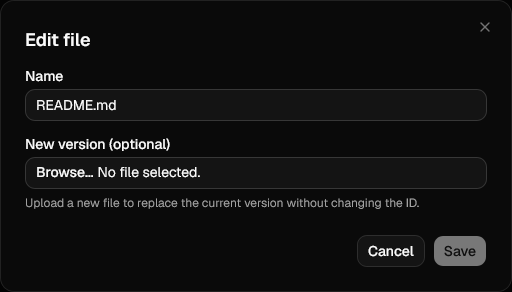
Editing renames the file, and optionally uploads a new version in place. The ID and the S3 key stay the same, so every challenge, question and page pointing at it picks up the new content with nothing to update on their side. Filename, MIME type and size are refreshed from the new upload.
Deleting
Deleting removes the stored object as well as the database row. Links to it break immediately, so check what references the file first.