Installing plugins
Plugins are Python packages. The instance installs them at container start, from the
list you put in the NEXCTF_PLUGINS environment variable.
What happens at start
- Every specifier in
NEXCTF_PLUGINSis installed into the application environment with uv. - Core database migrations run.
- Plugin database migrations run, for every installed plugin that ships some.
- The application starts and loads the plugins it finds installed.
Anything that fails in steps 1 to 3 stops the container instead of starting a
half-migrated instance, so a typo in a specifier shows up as a container that will not
come up. docker compose logs app has the reason, on a line starting with [start].
Specifiers
The variable holds a comma-separated list, and each entry is anything uv can install:
| Entry | Installs |
|---|---|
nexctf-sandbox |
Latest version from the package index. |
nexctf-sandbox==0.1.0 |
An exact version. |
git+https://github.com/NexCTF/Sandbox@v0.1.0 |
A git tag, branch or commit. |
/plugins/my-plugin |
A directory you mounted into the container. |
The comma is the only separator, so an entry can contain neither a comma nor a space:
write == rather than a range (>=0.1,<0.2 is read as two broken entries) and avoid
extras such as pkg[redis,s3].
Pin a version
Without a version, a plugin is re-resolved on every container recreation and an
instance can pick up a new release in the middle of an event. Pin exact versions with
== and upgrade deliberately.
Core dependencies are pinned by the image: a plugin that needs a different version of a package NexCTF itself uses fails to install rather than moving it under the running application. That is the error you get when a plugin is too old or too new for your NexCTF version.
uv settings
Installs run through uv, which reads its own configuration
from the environment. Anything it supports is available by adding variables to the app
service.
Private indexes
uv documentation: Package indexes
| Variable | Effect |
|---|---|
UV_DEFAULT_INDEX |
Replaces PyPI as the index packages are resolved from. |
UV_INDEX |
Extra indexes, space-separated, searched before the default one. |
UV_INDEX_<NAME>_USERNAME |
Username for the index named <NAME>, uppercased. |
UV_INDEX_<NAME>_PASSWORD |
Password or token for that index. |
An index is named by prefixing its URL with name=, and that name is what the
credential variables refer to:
services:
  app:
    environment:
      NEXCTF_PLUGINS: nexctf-sandbox==0.1.0
UV_INDEX: internal=https://packages.example.org/simple
UV_INDEX_INTERNAL_USERNAME: ${INDEX_USER}
UV_INDEX_INTERNAL_PASSWORD: ${INDEX_TOKEN}
Keep the values themselves in the .env file next to compose.yml, not in
compose.yml.
Custom certificate authority
uv documentation: TLS certificates
An index behind a corporate CA fails with a certificate verification error, because uv ships its own root certificates and ignores the system store by default.
When the certificate is already in the image's system store, tell uv to use that store instead of its bundled one:
Otherwise mount a bundle and point uv at it:
SSL_CERT_FILE applies to the whole container
It is not scoped to the install: the application and the scheduler read it too, so a
bundle holding only your internal CA breaks their own outbound TLS to the OIDC
provider, SMTP or external S3. Concatenate your CA with the public roots, or prefer
UV_SYSTEM_CERTS, which affects nothing but uv.
UV_NATIVE_TLS is the old name of UV_SYSTEM_CERTS and still works.
UV_INSECURE_HOST: packages.example.org disables verification for one host. It is a
last resort for a lab, not for an instance on the internet.
Proxies and offline installs
uv documentation: Environment variables and Caching
HTTP_PROXY, HTTPS_PROXY and NO_PROXY are honoured as usual. Two more are worth
knowing:
| Variable | Effect |
|---|---|
UV_HTTP_TIMEOUT |
Seconds before a download is given up on. Raise it on a slow link. |
UV_OFFLINE |
Install from the local cache only, never from the network. |
Downloads are cached in the uv-cache volume, so a container that is recreated with an
unchanged plugin list does not need the index again. That volume is what makes
UV_OFFLINE usable, and what lets an instance restart while its index is unreachable.
Installed plugins
Admin → Plugins lists what actually loaded, with the version of each plugin.
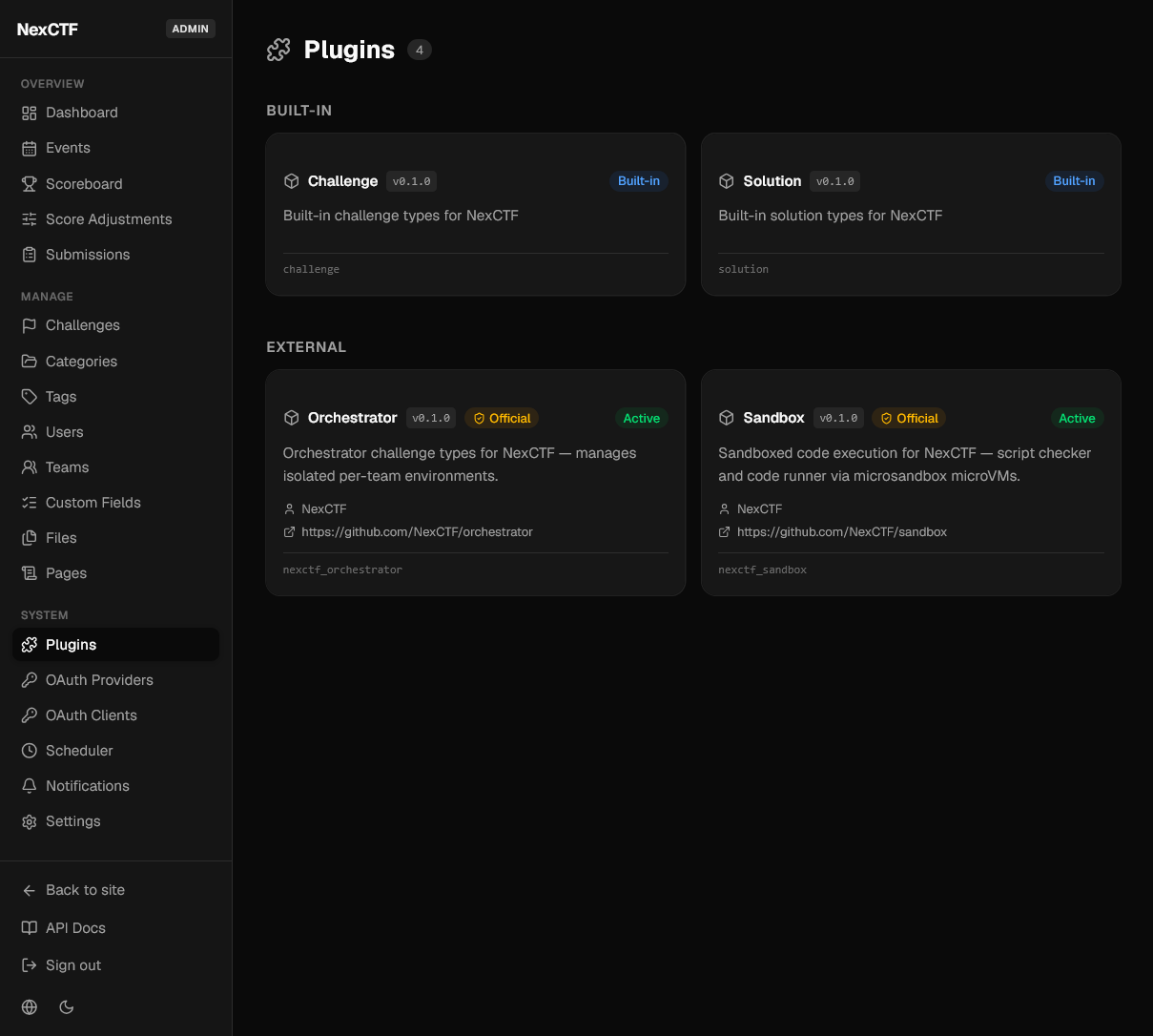
| Badge | Meaning |
|---|---|
| Built-in | Shipped with NexCTF itself, always present, nothing to install. |
| Official | Published by the NexCTF organisation. |
| Active | Loaded successfully and its types are available. |
| Inactive | Installed but failed to load. |
A plugin that failed to load shows its error on the card, and the same error is in
docker compose logs app under plugin.load_failed.
Plugin migrations can be inspected from the container:
$ docker compose exec app nexctf-plugins current
$ docker compose exec app nexctf-plugins history -p nexctf-sandbox
Updating
Change the version in NEXCTF_PLUGINS and recreate the container:
New migrations are applied on the way up. Take a database backup first when the update crosses a major version.
Removing
Roll back the plugin's tables before uninstalling it, because the commands come from the plugin itself and disappear with it:
Then drop the entry from NEXCTF_PLUGINS and recreate the container:
restart is not enough
Packages are installed inside the container, so docker compose restart leaves a
removed plugin installed and loaded. Only recreating the container gives you an
environment that matches the list.
Content created by a plugin (challenges of its type, solutions on a question) stops being loadable once its tables are gone. Delete or convert it first if you want to keep the questions around.